
Data Science in a business context, is about leveraging Computing, Statistics, and expert domain knowledge together to solve problems and get results. Using the right tool for the job is where computing comes into play. Process improvement and Automation is the easiest way to create value with Data Science skills especially if you are starting out.
In all corporate jobs you will do some or all of your work interacting with web applications (clicking, filling forms, downloading files). Automating repeated tedious tasks with a webscraping bots is one of my favorite tools. In this post I will walk you though a script I created that downloads economic historical data from the Federal Reserve website. Due to the janky nature of webscraping I will also go over some basic error handling in Python so you can make more fault tolerant scripts.
Development Process
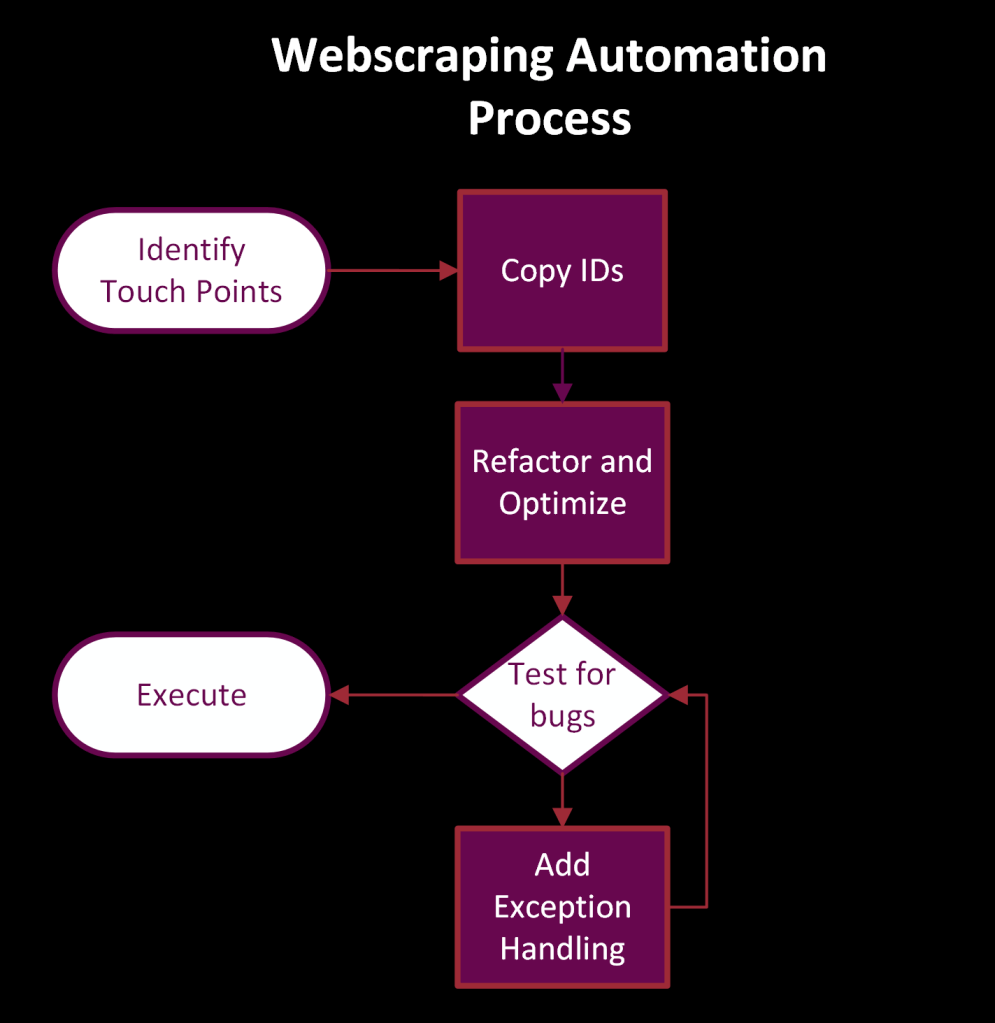
- Identify touch-points/pages
- Get touch points identifiers
- Test
- Exception handling
For example to download the CPI historical data from the Federal Reserve.
- The first thing we need is the URL, FRED uses a standard naming convention of /series/datacode. Which makes looping through multiple codes really easy.
- The download button opens up a menu to select a file type. To get the buttons location: right click on it -> inspect -> go to highlighted portion in the HTML -> right click -> copy xpath.
- Follow the same process to copy the xpath for the csv (data) element.

Converting Process to Code
The Python Code for this is pretty straightforward probably due to the 12 packages were importing.
The first portion creates a new folder for today’s date, the try except statement catches any folders with the same name and deletes that folder with its contents. Next we are configuring that created folder as the download path for our chrome driver. Finally, the driver is initialized with our configured settings.
# creating a new folder location for today
downloadPath = "D:\\Fred_Data\\"
new_folder = os.path.join(downloadPath, datetime.now().strftime("%Y_%m_%d"))

try:
    os.mkdir(new_folder)
except FileExistsError:
    shutil.rmtree(new_folder)
    os.mkdir(new_folder)


# configuring downloadPath
options = webdriver.ChromeOptions()
prefs = {"download.default_directory": new_folder,
         "download.directory_upgrade": True,
         "download.prompt_for_download": False
         }

# driver settings
options.add_experimental_option("prefs", prefs)
driver = webdriver.Chrome(service=Service(ChromeDriverManager().install()), chrome_options=options)
Since we will be downloading multiple data series I created a function that we can use that takes in a data code value. Now we could scrape all the data series they have if we wanted to.
Due to the janky nature of webscraping, it is important to create fault tolerant code. I used try -> except statement that catches the “NoSuchElementException” with Selenium will throw if the element isnt available on the page. Often times that is just due to the page not loading fast enough. When this happens, the web page refreshes, waits 3 seconds and then continues with the process.
def download_fed_csv(econ_data_code):

    '''
    Takes a econ time series code from the st. louis fed    website
    and downloads the csv to the download location
    '''

    fred_url = "https://fred.stlouisfed.org/series/"
    driver.get(fred_url+econ_data_code)
    time.sleep(2)

    try:
        driver.find_element(By.XPATH,"//*[@id='download-button']" ).click()
        time.sleep(1)
        driver.find_element(By.XPATH, "//*[@id='download-data-csv']").click()

    except NoSuchElementException:
        driver.refresh()
        time.sleep(3)
        driver.find_element(By.XPATH, "//*[@id='download-button']").click()
        time.sleep(1)
        driver.find_element(By.XPATH, "//*[@id='download-data-csv']").click()

    time.sleep(5)
Finally, to put it all together it is rather simple. Just iterating through a list, executing the function and closing the chrome driver.
# looping through list
data_codes = ["CPIAUCSL", "GDP"]

for code in data_codes:
    download_fed_csv(code)


driver.close()
Final Thoughts
In this post I went over from a high level how to construct a simple webscraping bot that can be used to automate tedious administrative process. Adding value with Data Science skills does not have to be limited to analysis. Often times automation can significantly reduce waste and frees up people’s time where they can add value commensurate to their abilities.
Showing impact of your can be a challenge for us Data Science types. Its hard to tie 1 to 1 the efforts in your analysis or models back to revenue. That’s why I like automation projects because you can easily show value add: Unstable wasteful process -> your efforts -> faster & more accurate process with labor cost reduction.
A few metrics that I collect throughout automation projects:
- Process duration
- Defect rate in process
- New Data that has been integrated
- Labor costs (if available)
As an example how you would measure the success of an automation project: Before the process took 2 people 2 hours a week to download various excel files from web systems. Labor cost is around $50/hour. With the automation the labor costs savings is $5200 annually and those people now have more time to do anything else. Not to mention bits and pieces of this code can be used for other processes. Something about compouding
 He Was A Data Boi
One response to “Webscraping in 15 Minutes”
Great stuff, Alex, keep it coming!
LikeLike