
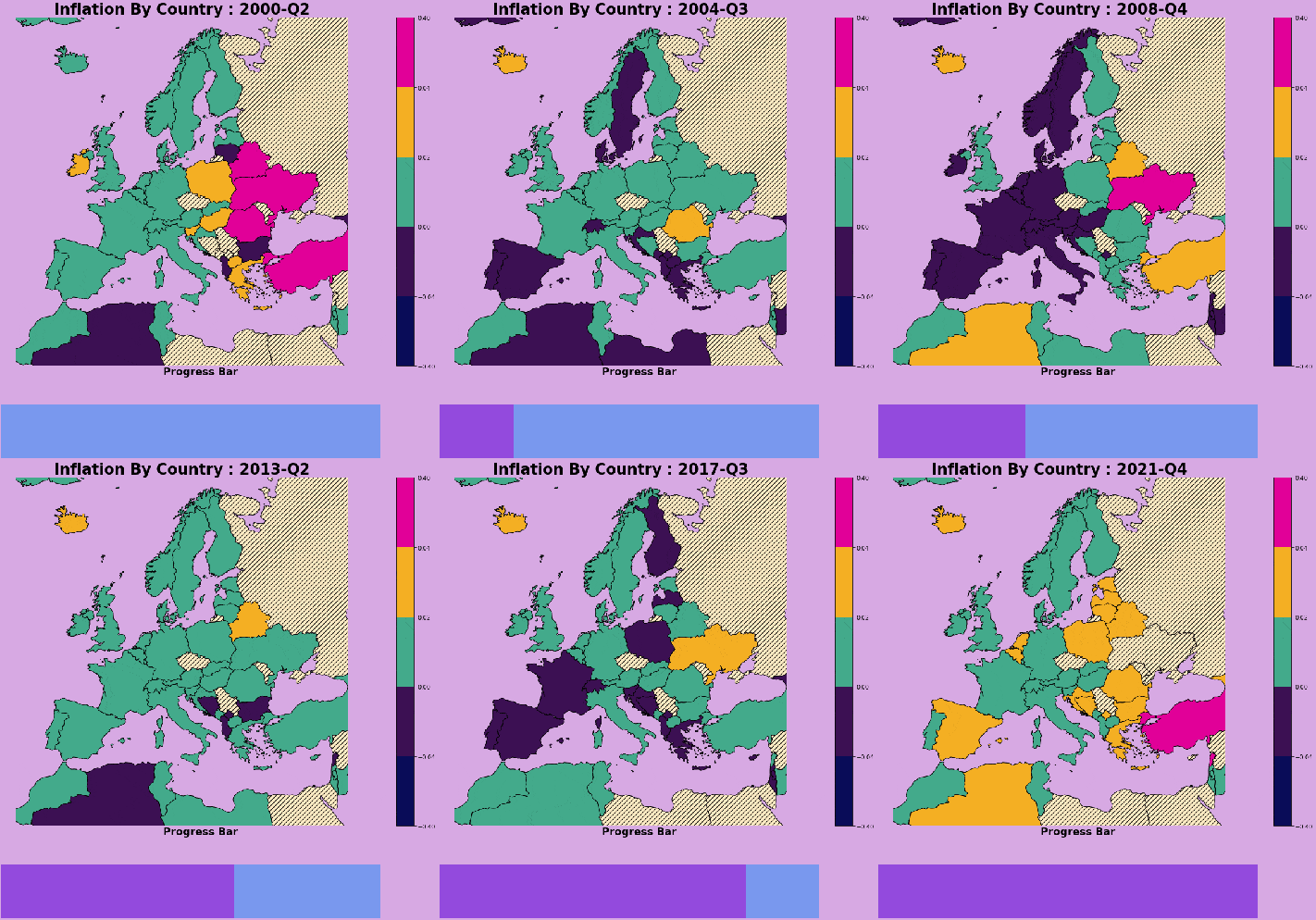
If you’re anything like me, a strategy gamer. You’ve spent way too many hours staring at this view of the Mediterranean. A good map should draw you in. I’m going to give you a quick guide in making one using Python.
The code to make maps is relatively simple thanks to the matplotlib and geopandas packages. If you have a specific vision and cant use the out of the box map templates. The community of geography enthusiasts have been generous with their data. This site is pretty solid.
from shapely import geometry
from shapely.geometry import Point, Polygon
import pandas as pd
import geopandas as gpd
from geopandas import GeoDataFrame

CountryBoundaries = '/vsicurl/https://github.com/C00ldudeNoonan/Global_inflation_viz/raw/main/ne_50m_admin_0_countries.shp'
CountryBoundaries = gpd.read_file(CountryBoundaries)
CountryBoundaries.crs = "EPSG:4326"
CountryBoundaries = CountryBoundaries.to_crs("EPSG:3035")
Shapefiles come in groups of four associated files. To read them in you just to use geopandas to read in the main file. Additionally maps follow a coordinate reference system. These projections can be altered depending on which part of the world you want to be in focus.
Pandas can be a little counterintuitive for those of us that are SQL people. So I’ll get some practice in so I’m still fresh. Below we got some list comprehensions, systematic column creation, pivoting wide to long, and replacing values.
# csv

transformation HeadlineInfaltionQuarterly = pd.read_csv("https://raw.githubusercontent.com/C00ldudeNoonan/Global_inflation_viz/main/Headline_inflation_quarterly.csv") HeadlineInfaltionSubset = HeadlineInfaltionQuarterly[HeadlineInfaltionQuarterly['Country'].isin(mapCountryList)] numCols = [int(col) for col in HeadlineInfaltionSubset if col.startswith('2')] # % change calculation between columns loop on filtercolumn list for col in numCols:   index = numCols.index(col)   if col== numCols[-1]:     pass   else:     HeadlineInfaltionSubset[str(numCols[index+1])+"_pct_change"] = (HeadlineInfaltionSubset[str(numCols[index+1])] - HeadlineInfaltionSubset[str(numCols[index])])/HeadlineInfaltionSubset[str(numCols[index])] # getting all columns for wide to long pivot filter_col = [col for col in HeadlineInfaltionSubset if col.endswith('_pct_change') or col =='Country'] HeadlineInfaltionSubset = HeadlineInfaltionSubset[filter_col] HeadlineInfaltionPivot = pd.melt(HeadlineInfaltionSubset                                  ,id_vars=["Country"]                                  ,value_vars=[col for col in HeadlineInfaltionSubset if col.startswith('2')]                                  ,var_name='Quarter'                                  ,value_name='HeadlineInflation') HeadlineInfaltionPivot["Quarter"] = HeadlineInfaltionPivot["Quarter"].apply(lambda x: x.replace("_pct_change", "")) HeadlineInfaltionPivot = HeadlineInfaltionPivot.astype({"Quarter": int, "HeadlineInflation": float}) print(list(HeadlineInfaltionQuarterly['Country'].unique())) # replace country value 'Czech Republic':'Czechia', 'Russian Federation': 'Russia', 'Egypt, Arab Rep.':'Egypt' HeadlineInfaltionPivot["Country"] = HeadlineInfaltionPivot["Country"].apply(lambda x: x.replace("Czech Republic", "Czechia")) HeadlineInfaltionPivot["Country"] = HeadlineInfaltionPivot["Country"].apply(lambda x: x.replace("Russian Federation", "Russia")) HeadlineInfaltionPivot["Country"] = HeadlineInfaltionPivot["Country"].apply(lambda x: x.replace("Egypt, Arab Rep.", "Egypt")) print(HeadlineInfaltionPivot.head()) # histogram of inflation value plt.hist(HeadlineInfaltionPivot['HeadlineInflation'], bins=20) plt.show()
Plotting in Python and R can be tedious because every element of the chart can be customized. Which isn’t too bad if you have a specific vision. In the code below, I have a function that creates a plot for each period in the inflation dataset. First ,I created a gridspec for the plot to split the plot area. The map will go in the top middle and the progress bar on the bottom. Second, I defined the color map for the scale and discrete value ranges for the scale, finally I create the map plot and progress bar and save the plot as a png.
def plot_frame(period):

  # subsetting and merging data frames
  plotdf = HeadlineInfaltionPivot[HeadlineInfaltionPivot['Quarter']==period]
  plotdf = euro_df.merge(plotdf, how='left', right_on='Country',left_on='SOVEREIGNT')
  plotdf = GeoDataFrame(plotdf)


  currentProgress = int(plotdf['Quarter'].min()-HeadlineInfaltionPivot['Quarter'].min())
  remainingTime = int(HeadlineInfaltionPivot['Quarter'].max()-HeadlineInfaltionPivot['Quarter'].min()) - currentProgress
  progressDf = pd.DataFrame({'currentProgress': [currentProgress], 'remainingTime': [remainingTime]})


  fig  = plt.figure(constrained_layout=False, figsize=(30, 15))
  gs1 = fig.add_gridspec(nrows=4, ncols=7, hspace=0.1)
  fig_ax1 = fig.add_subplot(gs1[0:3,:])
  fig_ax2 = fig.add_subplot(gs1[-1,3:6])

  # Limits

  #ax = plt.axes()


  # COLOR SCALES
  # vaporwave color pallete
  cmap = matplotlib.colors.ListedColormap([ '#090C58','#3C1053', '#4AC9E3'
                                            , '#43aa8b', '#F4AF23', '#E10098'
                                          ])
  bounds = np.array([-0.4,-0.04, 0, 0.02, 0.04, 0.4])
  norm = colors.BoundaryNorm(boundaries=bounds, ncolors=7)

  # plot bounds centered on Europe
  aoi_bounds = euro_df[euro_df['SOVEREIGNT']=='Germany'].geometry.total_bounds
  plot_bounds = [aoi_bounds[0]-1800000, aoi_bounds[1]+4200000, aoi_bounds[2]-4000000, aoi_bounds[3]+2000000 ]
  fig_ax1.set_xlim([plot_bounds[0], plot_bounds[1]])
  fig_ax1.set_ylim([plot_bounds[2], plot_bounds[3]])

  fig_ax1.set_title('Inflation By Country : ' + str(period)[:-1] + "-Q"+ str(period)[-1], fontsize=26, weight='bold', color="black")

  plotdf.plot(ax=fig_ax1
              , column='HeadlineInflation'
              , cmap=cmap
              , edgecolor="black"
              , norm=norm
              , legend=True
              ,missing_kwds={"color": "#ffecc4",
                             "edgecolor": "black",
                             "hatch": "///",
                             "label": "Missing values",
              },)

  # progress bar subplot
  progressDf.plot(ax=fig_ax2, kind = 'barh',stacked = True,mark_right = True, color=['#934add', '#7998EE'],legend=False)
  fig_ax2.set_title('Progress Bar' , fontsize=18, weight='bold', color="black",y=-100, pad=-50)

  # save image
  plt.rcParams['axes.facecolor'] = '#D7A9E3'
  filename = str(period) + ".png"
  fig_ax2.axis('off')
  fig_ax1.axis('off')
  plt.savefig(filename, bbox_inches='tight', facecolor='#D7A9E3')
  plt.close()

  return filename
There’s a few ways to create a gif, I found using the imageio package to be pretty intuitive as it is just adding each plot file from the previous function as a frame and writing the gif.
# loop through and saving gifs for each period
for period in list(HeadlineInfaltionPivot["Quarter"].unique()):
  filenames.append(plot_frame(period))

# build gif
with imageio.get_writer('Inflation_timelapse.gif', mode='I') as writer:
    for filename in filenames:
        image = imageio.imread(filename)
        imageframe2 = image
        writer.append_data(image)
        writer.append_data(imageframe2)

# Remove files
for filename in set(filenames):
    os.remove(filename)
Putting that all together gets you that striking chart at the top of the page. Additionally, you now have a reference for creating maps and gifs visualizations in python.
 He Was A Data Boi